Get in touch
I'm always excited to take on new projects and collaborate with innovative minds.
Phone
LinkedIn
I'm always excited to take on new projects and collaborate with innovative minds.
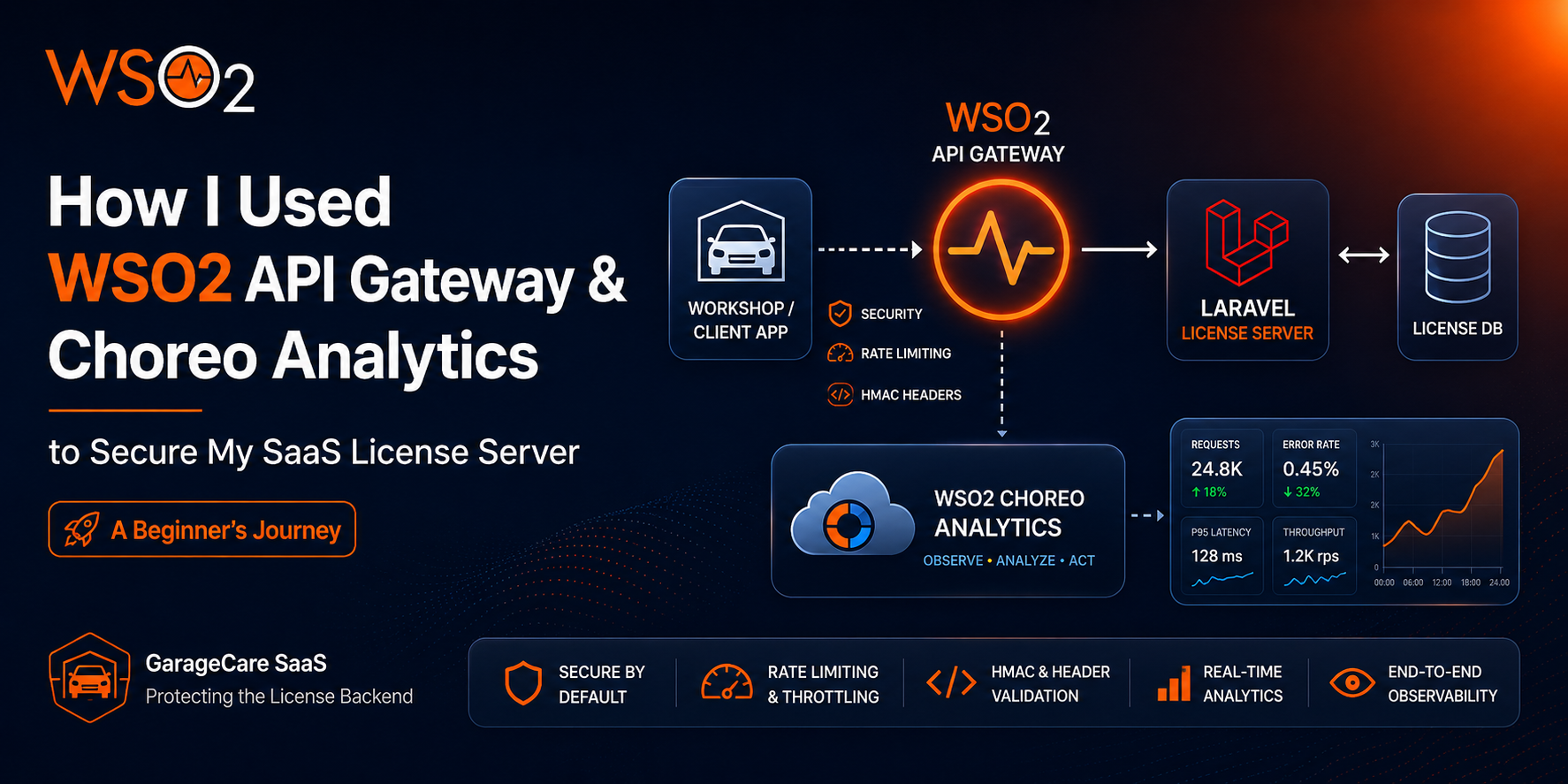
A practical walkthrough of putting an enterprise API Gateway in front of a Laravel-based licensing system and what I learned along the way.
I built GarageCare, a garage management system designed for automotive workshops in Sri Lanka. It handles everything from customer intake and job cards to invoicing, inventory, and payments. Over time it grew from a simple tool into a full-featured SaaS platform supporting multiple business verticals: general garages, service centres, car washes, detailing centres, and body shops.
And GarageCare operates on a per-installation license model, every workshop that installs the software must activate a license, and the application periodically phones home to validate its entitlements. That “phone home” target is my License Server: a standalone Laravel API that manages license activation, heartbeat validation, subscription status, and payment processing.
For a long time, the License Server sat naked on the internet. Laravel’s built-in rate limiting middleware was the only line of defense between the public internet and my business-critical licensing logic. That worked when I had a handful of early customers. But as the platform matured with 66 models, 42 services, 1,557 tests, insurance claims, multi-branch operations, the stakes changed dramatically.
I needed to answer three questions:
The answer turned out to be WSO2 API Manager for the gateway, and Choreo Analytics for the observability layer.
Before WSO2, my security architecture looked like this:

Laravel’s throttle middleware handled rate limiting. A custom VerifyHmacSignature middleware validated that every request carried a valid cryptographic signature. It worked, but it had fundamental weaknesses.
1. Every request still hits PHP. Even a rejected request consumes a PHP-FPM worker, parses the request body, and runs middleware logic. Under a sustained brute-force attack, the application itself becomes the bottleneck.
2. Throttle state is local. Laravel’s throttle middleware uses the application's cache (Redis or file). In a scaled deployment, there's no shared state when an attacker hitting different nodes circumvents per-node limits.
3. No traffic visibility. Laravel logs are great for debugging, but they don’t give you a real-time operational dashboard with total traffic, error rates, latency percentiles, top consumers. You have to build all that yourself.
4. No API lifecycle management. Want to deprecate an endpoint, version your API, or generate developer documentation? With raw Laravel, that’s manual work for every change.
An API Gateway solves all four problems by sitting in front of the application, making decisions at the edge before a single byte reaches PHP.
WSO2 API Manager is a full API management platform. The edition I used, WSO2 API Manager 4.4.0 ships as a single Docker image and bundles:
| Component | What It Does | Why I Needed It |
|---|---|---|
| API Gateway (Synapse) | Reverse-proxies all traffic, applies policies at the edge | Throttle abuse before it hits my Laravel backend |
| Publisher Portal | Web UI for designing, importing, and managing API definitions | Import my OpenAPI spec and configure routing visually |
| Admin Portal | Web UI for rate limiting policies, blocklist management | Create tier-based throttle policies (Basic / Pro / Enterprise) |
| Developer Portal | Self-service portal for API consumers | Not used yet, future use for partner integrations |
With the Gateway in place, the traffic flow changed fundamentally:
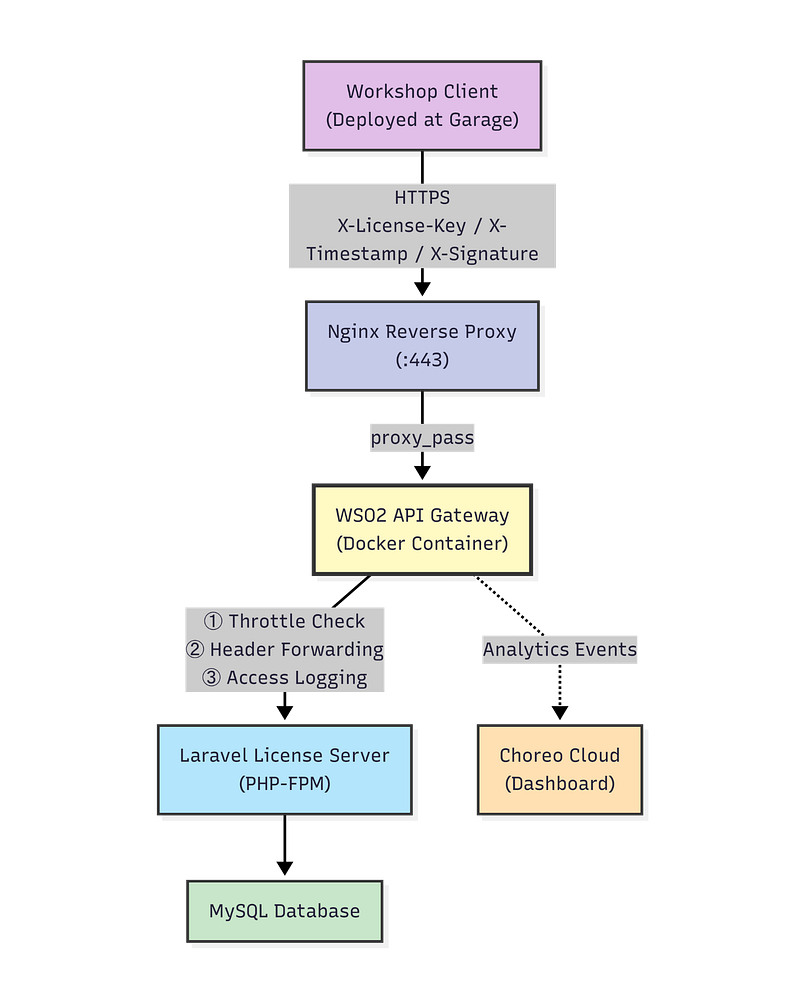
The key insight is that the Workshop clients didn’t change at all. Every deployed installation kept using the same URL structure, the same HMAC headers, the same request format. The only thing that changed was the DNS pointing from the raw server to a new API subdomain that routes through the Gateway.
This was the trickiest part of the integration, and it’s worth explaining because it’s a scenario many SaaS developers will face.
GarageCare doesn’t use OAuth2 tokens or API keys in the traditional sense. Instead, every API call carries three custom headers:
| Header | Purpose |
|---|---|
X-License-Key | Identifies the calling workshop |
X-Timestamp | Unix epoch — request validity window |
X-Signature | HMAC-SHA256 digest proving the caller possesses the API secret |
The signature is computed over the concatenation of the license key and timestamp, using a per-license API secret that only the legitimate workshop installs and the License Server know.
This is a zero-overhead authentication scheme with no token refresh flows, no OAuth dance, no round trips. Every request is independently verifiable. Laravel’s VerifyHmacSignature middleware validates the signature server-side.
By default, WSO2 API Manager expects OAuth2 or API Key authentication. It’s designed around its own Key Manager issuing tokens, and applications subscribing to APIs through the Developer Portal.
That’s a great model for public API programmes. It’s completely wrong for my use case. I don’t want WSO2 to authenticate requests, Laravel does that. I want WSO2 to transparently forward the HMAC headers and let Laravel validate them exactly as it always has.
The fix was straightforward once I understood WSO2’s security model:
X-License-Key, X-Timestamp, and X-Signature through the Gateway.The result: WSO2 applies its throttling policies and logs every request, but it never interferes with the HMAC authentication flow. Defense in depth, the Gateway handles rate limiting and traffic shaping, Laravel handles cryptographic authentication.
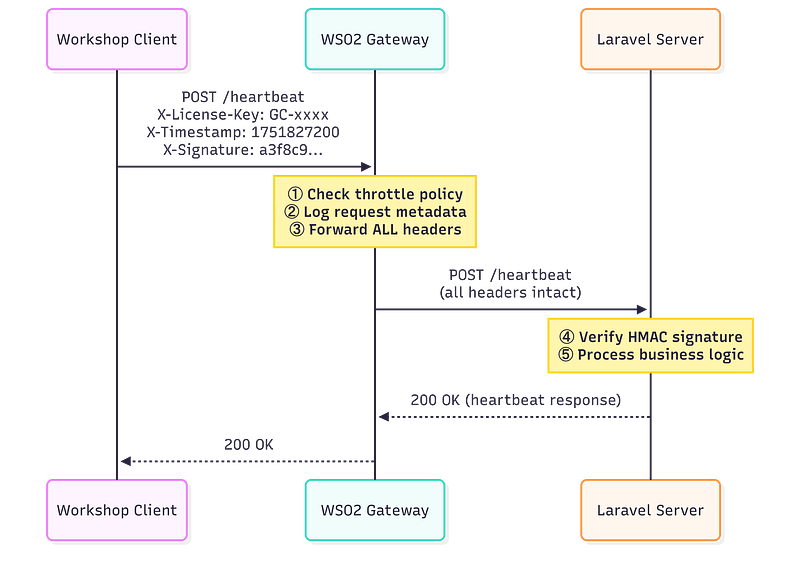
One of the most valuable features of the Gateway is subscription-tier throttling. My licensing model has three tiers — Basic, Professional, and Enterprise, each with different API rate limits.
Before the Gateway, I had to implement this in Laravel:
// Old approach — throttle in Laravel middleware
Route::middleware(['throttle:30,1'])->post('/licenses/activate', ...);
Route::middleware(['throttle:60,1'])->post('/heartbeat', ...);
This was fragile. Every request still consumed PHP resources before being rejected. And changing limits meant redeploying code.
With WSO2, throttling is declarative and externalized:
| Tier | Requests / Minute | Burst Limit | Applied To |
|---|---|---|---|
| Basic | 30 | 5 req/sec | Small workshops |
| Professional | 120 | 10 req/sec | Medium workshops |
| Enterprise | 300 | 20 req/sec | Large operations |
When a workshop exceeds its quota, the Gateway returns HTTP 429 Too Many Requests immediately, PHP never sees the request. The Laravel middleware remains as a defense-in-depth backstop, but in normal operation, the Gateway catches all abuse at the edge.
The heartbeat endpoint gets an additional resource-level policy: 20 requests per hour per license key. Since heartbeats are scheduled every 6 hours in the Workshop client, 20/hour is extremely generous for legitimate use, but tight enough to catch any misconfigured or abusive installation.
WSO2 API Manager is a Java application running on Apache Tomcat. Installing it bare-metal means managing Java versions, environment variables, Tomcat configuration, and startup scripts. For a one-person engineering team, that’s operational overhead I don’t need.
Docker makes it a single service definition — image, ports, volumes, resource limits. Two critical decisions I made:
1. Gateway ports bound to localhost only. The Gateway and Portal ports are never exposed to the public internet. Nginx terminates TLS on port 443 with a proper Let’s Encrypt certificate and proxies internally. The Docker container is invisible to port scanners.
2. Resource limits. WSO2’s JVM is configured with a 2 GB heap, and Docker enforces a 3 GB hard memory cap. On an 8 GB VPS that also runs Laravel and MySQL, this prevents the JVM from starving the other processes during garbage collection spikes.
Rather than manually clicking through the Publisher UI to define each endpoint, I wrote an OpenAPI 3.0 specification covering all six API endpoints. Then I imported it into WSO2 Publisher in one step.
This approach has a huge advantage: the spec is version-controlled alongside the application code. When I add a new endpoint to Laravel, I update the YAML file, re-import it, and deploy a new revision. The API definition and the application code evolve together.
After the Gateway was running, I had throttling and header forwarding working perfectl, but I was flying blind. I could check Nginx access logs for raw request counts, but I had no operational dashboard showing:
This is where Choreo comes in.
Choreo is WSO2’s cloud-native developer platform. It offers a free tier that includes API analytics, you generate an on-premises key, add three lines to your WSO2 configuration, and the Gateway starts securely streaming anonymised metrics to the Choreo cloud.

The entire Choreo integration is three lines in WSO2’s deployment.toml:
[apim.analytics]
enable = true
config_endpoint = "https://analytics-event-auth.choreo.dev/auth/v1"
auth_token = "<your-on-prem-key>"
After restarting the container, WSO2 begins batching analytics events and pushing them to the Choreo cloud every few minutes. The first data appeared in the Choreo dashboard within about 5 minutes.
The Usage Insights page in Choreo gives me exactly what I needed:
| Metric | What It Tells Me |
|---|---|
| Total Traffic | How many API calls are hitting the Gateway per time window |
| Error Request Count | How many requests are failing (4xx / 5xx) |
| Average Error Rate (%) | The health of my API at a glance |
| 95th Percentile Latency | How fast the Gateway + Laravel pipeline responds for the vast majority of requests |
| API Request Summary | A time-series graph of success vs. error vs. latency |
For a licensing system, the latency metric is particularly important. If the heartbeat endpoint starts responding slowly, workshops might flag false “license expired” warnings to their users. Monitoring the 95th percentile lets me spot degradation before it becomes user visible.
I came into this project with zero WSO2 experience. Here’s what I wish I’d known from day one:
Almost every WSO2 tutorial, blog post, and official example assume you’ll use the built-in Key Manager to issue OAuth2 tokens. If you have your own authentication scheme (like HMAC), you need to dig into the Publisher UI to find the per-resource security toggles. The documentation doesn’t prominently feature this use case.
Tip: In the Publisher → Resources tab, clicking the padlock icon on each endpoint toggles security on/off at the resource level. This is how you tell WSO2 to pass traffic through without token validation.
deployment.toml Is Sacred — No DuplicatesWSO2’s configuration parser (TomlParser) will crash the entire server if you accidentally define the same TOML section twice. I learned this the hard way when I pasted an [apim.analytics] block at the bottom of the file without realizing it already existed higher up. The server entered a crash loop, restarting every 60 seconds.
Tip: Before editing deployment.toml, always search for the section name first. Each [section.name] can only appear once in the entire file.
In WSO2 4.4.0, clicking “Publish” in the Publisher makes the API visible in the Developer Portal, but it does not deploy it to the Gateway runtime. You must separately go to Deployments → Deploy New Revision to push the API definition to the Gateway’s Synapse engine.
I spent an embarrassing amount of time debugging 404 errors before realizing the API was “published” but never “deployed.”
WSO2 is a JVM application. On a 2-vCPU VPS with a 2 GB heap, the first boot takes about 2–3 minutes. During this time, any request to the Gateway returns a 502 from Nginx. This is normal — don’t panic. Watch the Docker logs for the WSO2 API Manager started in X seconds message.
Don’t expect real-time data in the Choreo dashboard. WSO2 batches analytics events and pushes them every few minutes. After the first push, there’s an additional processing delay on the Choreo side. Budget about 5–10 minutes before your first traffic appears on the graphs.
The final architecture implements four distinct security layers:
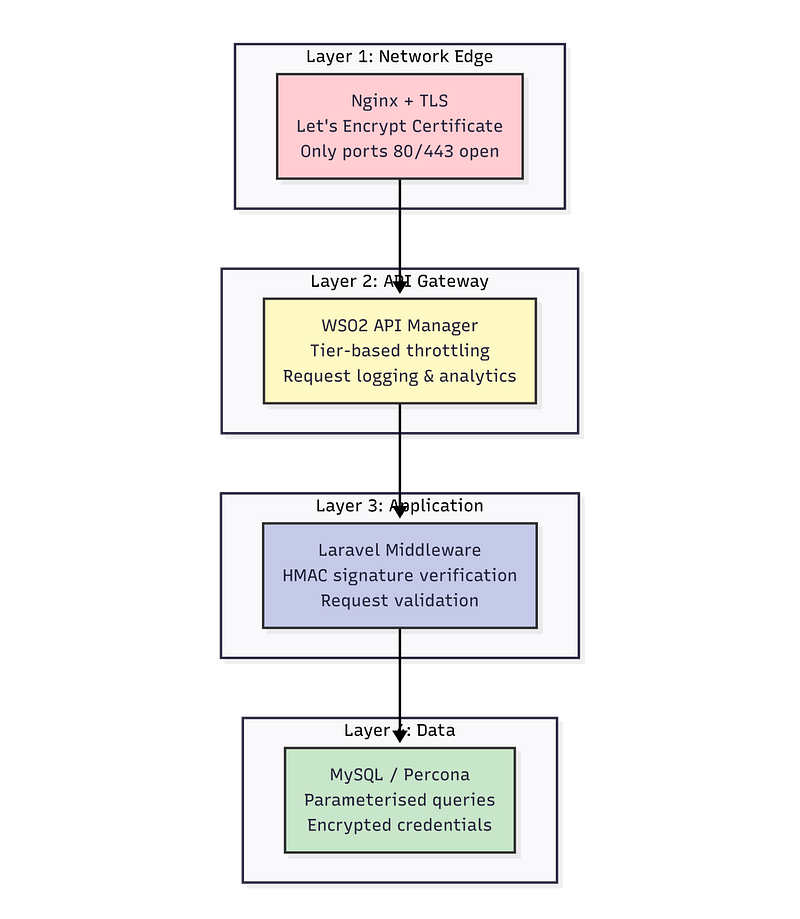
| Layer | Responsibility | What Gets Blocked |
|---|---|---|
| Nginx | TLS termination, proxy routing | Plain HTTP (redirected to HTTPS) |
| WSO2 Gateway | Rate limiting, access logging, traffic shaping | Brute-force attempts, quota-exceeding clients |
| Laravel Middleware | HMAC signature verification, input validation | Unsigned requests, tampered payloads, expired timestamps |
| Database | Parameterised queries, credential hashing | SQL injection (via Eloquent ORM) |
The important principle is that no single layer is responsible for all security. If the Gateway somehow fails open, Laravel’s HMAC middleware still rejects unsigned requests. If Laravel’s middleware has a bug, the Gateway’s rate limits still prevent mass exploitation. Each layer assumes the others might fail.
Absolutely. Here’s my honest assessment:
For a SaaS product with a licensing API that must be reliable and secure, the trade-off is strongly positive. The Gateway gives me capabilities that would have taken weeks to build in Laravel and would have been far more fragile.
This was Phase 1 — getting the Gateway and analytics running. Future phases include:
If you’re considering WSO2 API Manager for your own project, here are the resources I found most useful:
| Resource | Link |
|---|---|
| WSO2 API Manager 4.4.0 Documentation | apim.docs.wso2.com |
| WSO2 Docker Images | hub.docker.com/r/wso2/wso2am |
| Choreo Developer Platform | console.choreo.dev |
| OpenAPI 3.0 Specification | swagger.io/specification |
| WSO2 deployment.toml Reference | Config Catalog |
I’m a solo developer building GarageCare for the Sri Lankan automotive industry. If you’re working on a similar SaaS licensing architecture or have questions about WSO2 integration, feel free to connect with me on LinkedIn or drop a comment below.
Tags:#WSO2#APIGateway#Choreo#Laravel#SaaS#APIManagement#Security#DevOps
Your email address will not be published. Required fields are marked *